Is your business loan application being rejected due to some delinquencies in your Equifax Commercial Credit Report? Basically, being a business owner or director of a limited company, whenever you apply for a business loan—such as a cash credit facility, overdraft, term loan, or any other credit products—the bank manager reviews your commercial credit report to get a detailed insight about your company’s creditworthiness and financial history.
In the credit risk assessment process, the CIBIL MSME Rank is the most popular one and commonly used by bank managers. However, nowadays, many bank managers also prefer to review multiple commercial credit reports from different bureaus. For this purpose, they may check your Equifax Commercial Report as well. Now, any kind of errors in the report or a poor Equifax Commercial Rank will lead to loan rejection. In this situation, you should check your company’s credit report on your own and rectify those errors accordingly.
In today’s blog, we will focus on the initial step—that means, the procedure to generate your Equifax Commercial Credit Report online. But before we move on to the step-by-step guide, let’s first understand a little about the Equifax Company Credit Report and Commercial Rank.
What is an Equifax Commercial Credit Information Report?
Equifax Commercial Credit Report is a multi-dimensional, comprehensive credit summary specially designed for small, medium and large enterprises. It provides an unbiased view of the lending landscape and strengthens the credit underwriting process.
Being one of the leading credit information companies, Equifax India maintains a large database of commercial entities, collected from its member financial institutions, including banks, NBFCs, and housing finance companies.
By summarising the credit data and loan repayment history over the last 36 months (or last three financial years), Equifax India generates a unique Commercial Rank for each commercial borrower.
This Equifax Commercial Rank is a risk prediction model for commercial entities, based on some key parameters such as loan repayment pattern, recent delinquencies, overall credit utilisation, financial stress in related trades, the number of active loans, etc.
The rank has a scale between 1 to 10, where a rank between 1 and 4 is considered good and reflects strong credit management. A rank above 4, indicates higher risk and suggests that the business may be struggling to maintain a healthy credit profile.
Why should you check your Equifax Commercial Credit Report?
Error Correction:
If the bank manager confirms that there is some delinquency in your Equifax Commercial report, then checking your business credit report allows you to identify the inaccuracies and file those disputes with Equifax.
Monitor Business Health:
The report provides a comprehensive overview of your business’s financial condition, helping you understand its creditworthiness and solvency. You can also optimise your credit usage and make the required improvements to enhance future borrowing opportunities.
In fact, it is advisable to check your commercial credit report from leading credit bureaus such as Equifax India before applying for a loan. This proactive step can help you avoid unexpected loan rejections.
Informed Business Decisions:
It also enables you and lenders to better evaluate your business’s creditworthiness, allowing for more informed decisions when applying for new loans or credit.
How to check the Equifax Commercial Credit Report?
If you’re planning to check your Equifax Commercial Report for the first time, it’s important to note that Equifax India provides free access to credit reports only for individual borrowers. If you are a commercial entity—whether a proprietorship, partnership firm, private limited company, or public limited company—you will need to purchase your Equifax Commercial Report by paying a nominal fee. Currently, the cost of a one-time commercial report is around ₹600.
Step 1: Apply for an Equifax Commercial Credit report
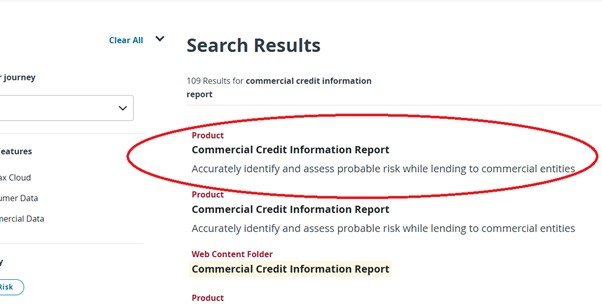
2. Click on the search bar and type “Commercial Credit Information Report.” Then, proceed to the next step.
3. From the search results, select the first option, “Product: Commercial Credit Information Report,” as shown in the image below, and click on it.
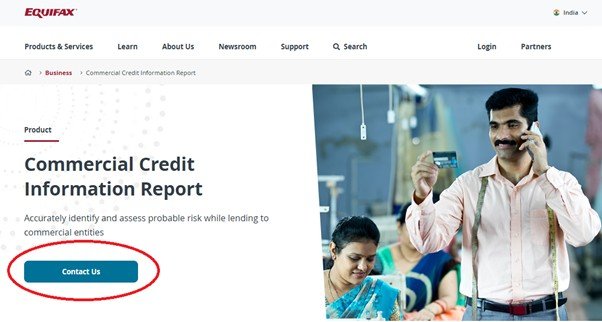
4. Then a new page will open for you, where you can find a Contact Us button as circled in the picture below. Click on it to proceed further.
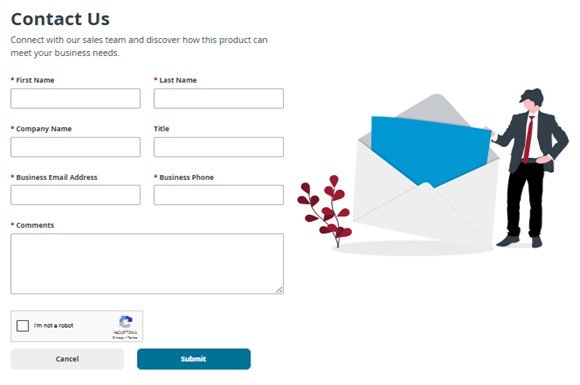
5. Next, a Contact Us form will open. To apply for a Commercial Equifax Credit Report, fill in the form with your business details and contact information. In the comment box, briefly mention your purpose, for example: “I would like to obtain my Equifax Commercial Credit Report for my company, XYZ Pvt. Ltd.” Once done, tick the check box and click for final submission.
Step 2: Follow the instructions shared by the Equifax Customer Support team
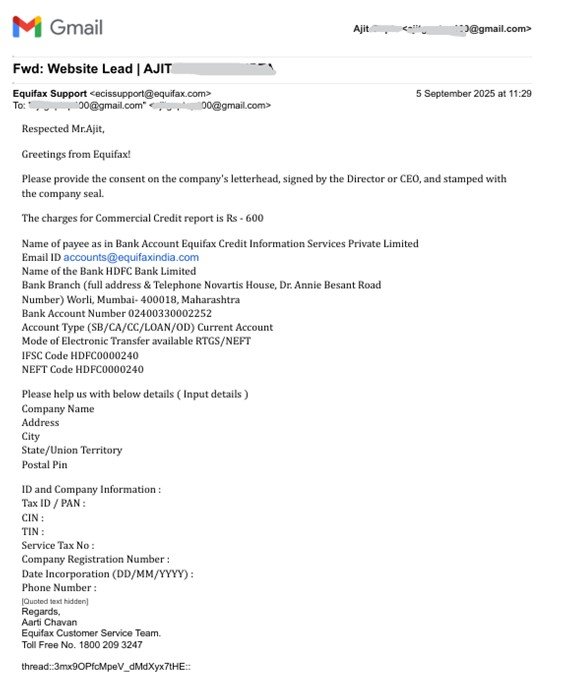
After submitting the online form, the Equifax support team will contact you within 2-3 working days via email. In that email, they will share the chargeable amount along with the account information as shown in the picture below. As we mentioned earlier, you are required to pay ₹600 for a one-time Equifax commercial credit report.
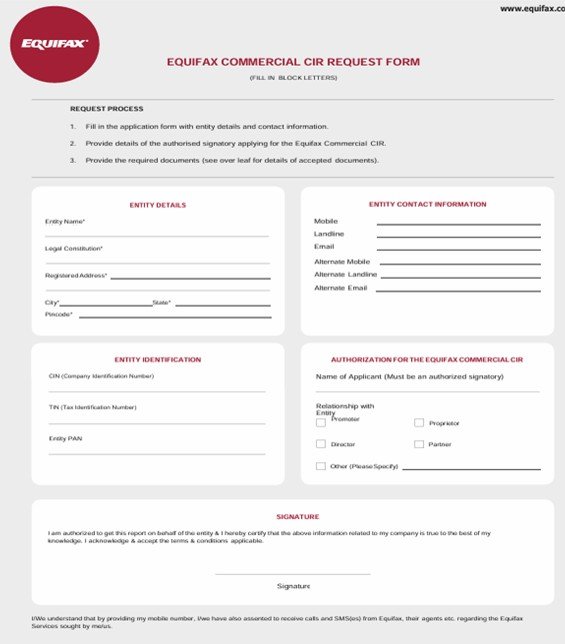
Make the payment through NEFT/RTGS and keep the transaction record for future reference.In the same email, the Equifax support team will also share an Equifax Commercial CIR Request Form. In this form, you will need to provide your company details, such as Entity Name, Legal Constitution, Registered Address, Mobile Number, and Email ID, along with your entity’s identification details (PAN, TIN, CIN, etc.).
As the authorised signatory of your company, mention your name, designation, and affix your signature accordingly.
Along with the request form, you must provide a separate consent letter on your company letterhead, duly stamped and signed by the authorised signatory. You will also need to attach the supporting documents as required, depending on the legal constitution of your entity.
For Proprietorships Company:
• Company Address Proof (Any 1):
Utility Bill (Telephone or Electricity Bill), Bank Passbook or Account Statement, Registered Lease/Sale Agreement of office premises, Proof of Address issued by Scheduled Commercial Banks/Multinational Foreign Banks, Registration Certificate issued under Shops and Establishment Act.
• ID Proof of the Proprietor (Any 1)
Attach the proprietor’s PAN / Driving License / Passport
******Please note that all the documents need to be self-attested by the proprietor
For Partnership Firm:
• Company Address Proof (Any 1)
Telephone or Electricity Bill, Bank Passbook or Account Statement, Registered Lease/Sale Agreement of office premises, Proof of Address issued by Scheduled Commercial Banks/Multinational Foreign Banks, Registration Certificate issued under Shops and Establishment Act
• Company Details
Partnership Firm Pan
Copy of Partnership Deed or Certificate of Registration
List of Authorised Signatories with specimen signatures/Authority Letter signed by any Partner with PAN number and Company Stamp
• Identification details of any of the Partners (Any 1):
Any of the partner’s PAN / Driving License / Passport
******Please be noted, all the documents need to be self-attested by the partner submitting the request for CCR.
For Public / Private Limited Companies
• Company Address Proof (Any 1)
Telephone or Electricity Bill, Bank Passbook or Account Statement, Registered Lease/Sale Agreement of office premises, Proof of Address issued by
Scheduled Commercial Banks/Multinational Foreign Banks, Registration Certificate issued under Shops and Establishment Act.
• Company Details:
i. Company Pan
ii. Copy of Board Resolution along with authorised signatory list and specimen signature OR Authority letter signed by Company Secretary/Managing Director/Director with DIN number and Company stamp
• Identification details of any of the Directors (Any 1):
ID Proof (PAN / Driving License / Passport) of the authorised signatory submitting the request for CCR
Step 4: Get access to your Equifax Commercial Credit report.
Email all the required documents along with the payment confirmation to the Equifax Customer Support Team at ecissupport@equifax.com. Once they verify the details, you will receive the latest copy of your Equifax Commercial Credit Report in your email.








Fak lons