When it comes to rectifying errors in your credit report, filing an online dispute is the most convenient way to escalate your complaint with the concerned credit bureau authorities. However, among the four major credit information companies in India—Trans Union CIBIL, Experian, CRIF Highmark, and Equifax—Equifax India was the only one who did not have any online dispute filing form on their website. But recently, Equifax India has introduced a Consumer Dispute Resolution Form for individual borrowers, making it easier for people to raise disputes directly with their complaint handling offices. In today’s blog, we have discussed the entire Equifax online dispute procedure stepwise with real-life examples. So, follow these methods and rectify your Equifax credit report hassle-free.
Check your Equifax Credit Report and identify the errors:
Typically, errors in a credit report can arise from various reasons. It may be due to the lender’s fault, where they fail to update accurate and up-to-date information in your Equifax credit report, or because of technical issues within the credit bureau itself, or even miscommunication between these two parties.
Whatever the reason, before raising an online dispute with Equifax, you should review your credit report carefully. This will help you identify the root cause of the incorrect information and select the most appropriate option during the Equifax online dispute process.
Alternatively, you can obtain your Equifax report from your bank or a trusted third-party app. Make sure the report includes an Equifax Report Order Number that you’ll need to enter in the Equifax online dispute form.
After receiving the report, review every section carefully, especially the Accounts section. Then highlight any information that is incorrect or does not belong to you.
Follow these steps to raise online dispute in Equifax:
Now, you’ve to proceed further to rectify all those incorrect details in your Equifax credit report.
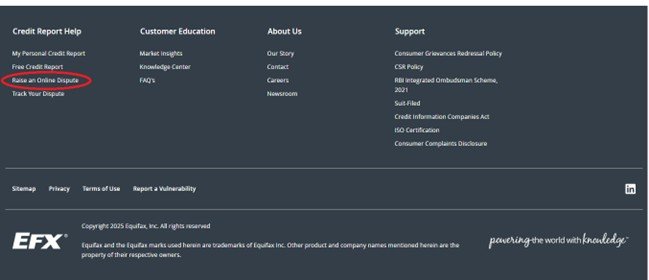
To raise Equifax online dispute, visit the Equifax India official Website: https://www.equifax.co.in/. You will be directed to their homepage, as shown in the picture below.
2. Scroll down to the bottom of the page, where you will find the “Credit Report Help” section. Under this section, you will see the option “Raise an Online Dispute”, as highlighted in the picture below. Click on this link to proceed further.
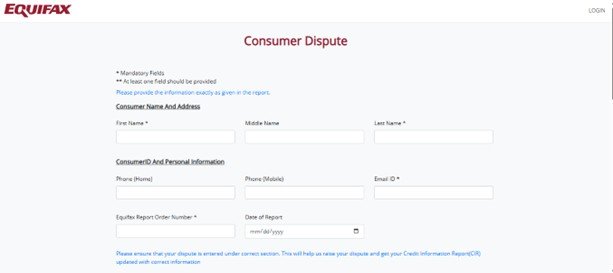
3. Then the Equifax Consumer Dispute form will be open to you. In the first half of the form, you have to enter your Name and contact details. Try to use the email ID or mobile number that you’ve used at the time of report generation or the one linked with most of your loan accounts.
Next, enter your Equifax Report Order Number and Report Date (usually mentioned at the top left corner of your report). Make sure these details are accurate so that the Equifax customer support team can easily retrieve your report from their system.
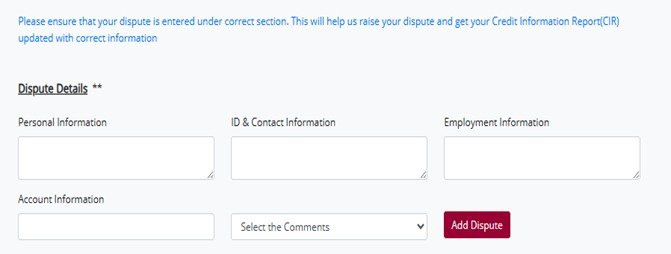
4. Here, you need to clearly the details for which you are disputing. If the dispute is related to personal information (such as a misspelt name, incorrect date of birth, or wrong gender), mention it under the “Personal Information”
For disputes related to mobile numbers, email IDs, or identification details, mention them in the “ID & Contact Information” section.
Similarly, if the dispute concerns your occupation or salary, mention it under the “Employment Information” section.
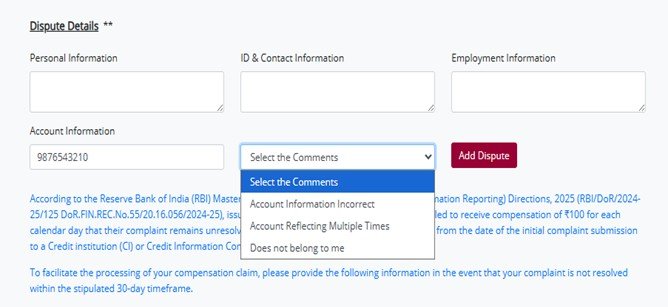
5. If you find an error in the Account Section, enter the account number in the given box and select the most appropriate option from the side comment bar (such as “Account Information Incorrect,” “Account Reflecting Multiple Times,” or “Does Not Belong to Me”). After that, click on the “Add Dispute”
Similarly, you can raise disputes for other issues in multiple accounts by repeating the same process.
For example, if you notice an unknown loan account in your Equifax credit report that does not belong to you, enter the account number in the “Account Information” box, select the comment “Does not belong to me”, and then click on “Add Dispute.”
In another case, if you find that your genuine loan account is incorrectly reported as “Written Off” despite having cleared the entire outstanding amount, enter the account number in the “Account Information” box, select the comment “Account Information Incorrect”, and then add the dispute accordingly.
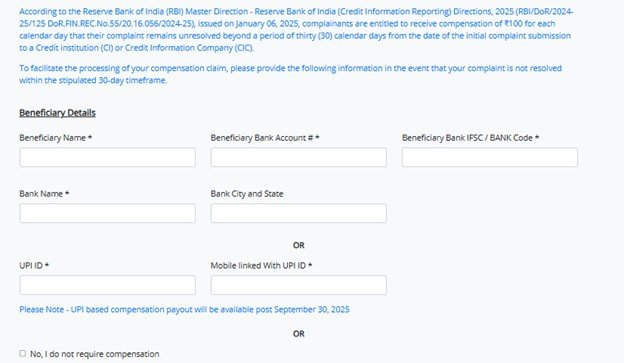
6. As per the RBI’s new CIC updation policy, Equifax is required to resolve your dispute or case ID within 30 calendar days. If they fail to do so within this time frame, you become eligible for compensation of ₹100 for each day of delay. For this reason, you must provide your savings account number, current account number, or UPI ID in the Equifax online dispute form.
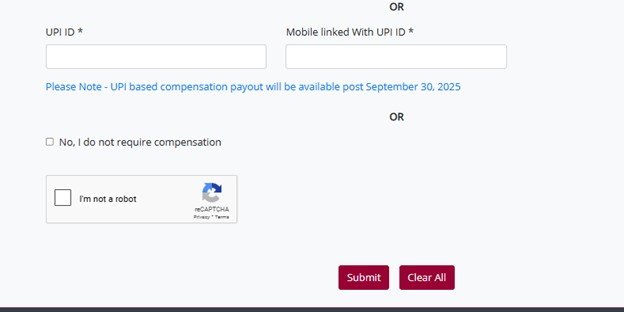
If you choose not to claim compensation, simply select the checkbox that says, “No, I do not require compensation.”
7. Before submitting the Equifax online dispute form, check all the details mentioned above. Select the capture and click on the final submission button.
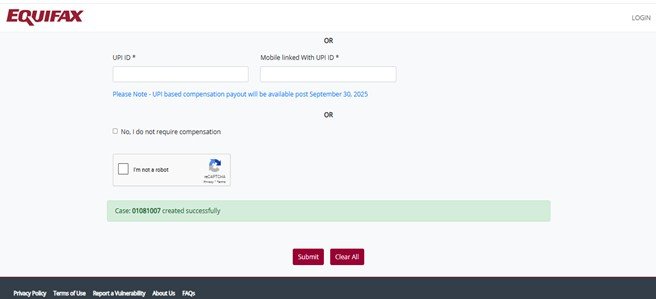
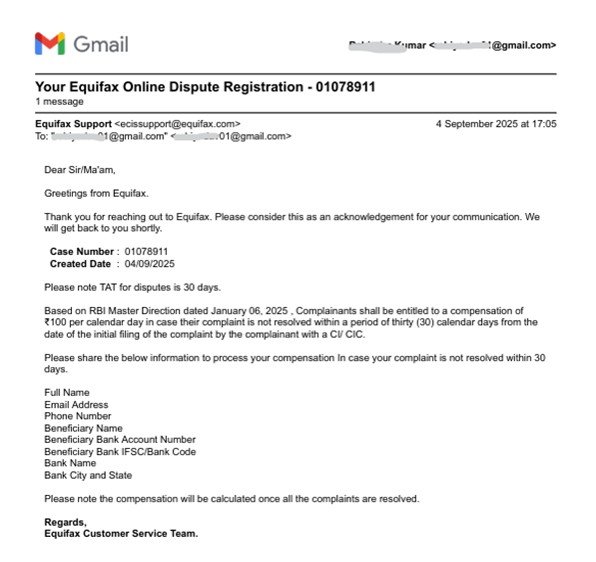
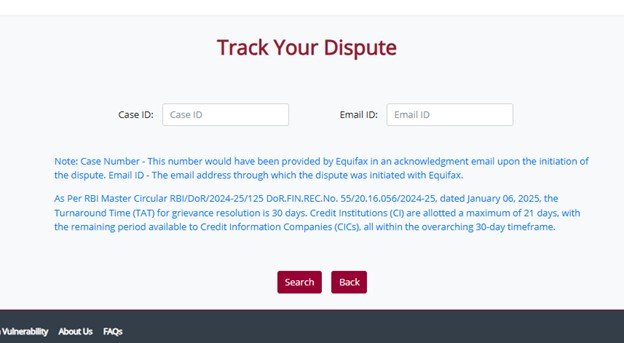
8. Once the dispute is submitted, a case ID will be generated, and that will also be sent to your email id as well.
9. Keep checking your registered email ID for further updates from Equifax and respond promptly. In cases where an incorrect account status is reported, the Equifax support team may request you to provide a brief explanation of your complaint along with valid payment proof. Make sure to follow up regularly with their team until your dispute is fully resolved.
When you raise an online dispute in Equifax, they forward the disputed details to the concerned lenders, who report the particular information to them. Based on the clarification from the lender, they will resolve your respective case ID. If the dispute is resolved in your favor, Equifax will make the necessary corrections and provide you with a complimentary updated report. However, if the lender confirms that the reported information is accurate, Equifax will close the case ID without making any changes.
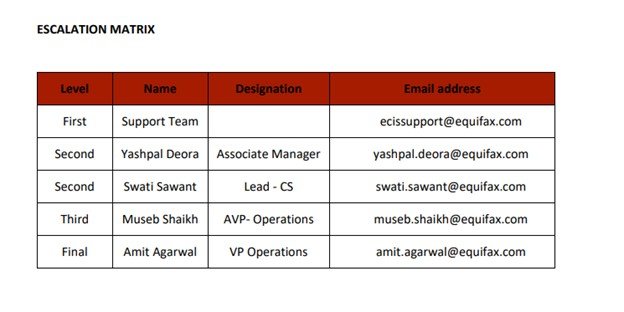
The entire Equifax dispute resolution process takes up to 30 calendar days. If the Equifax customer support team fails to resolve your query within this timeframe, or if you are not satisfied with their response, you can escalate your grievance to their higher authorities as listed below.